VMware Data Recovery: Enterprise Architecture, Tools & Best Practices
VMware data recovery restores virtual machines after failures using backups, replication, and automated orchestration — your first and last line of defense against ransomware, downtime, and data loss.
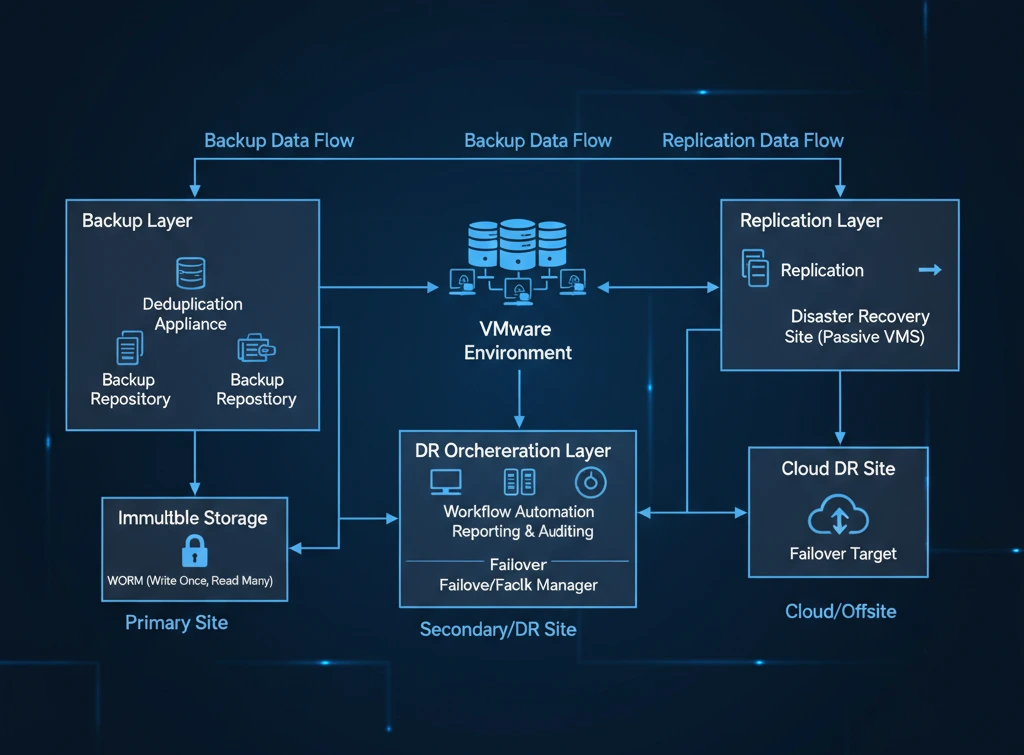
Virtualization runs the modern enterprise. Thousands of workloads — databases, ERP systems, customer portals — sit on VMware infrastructure. When something goes wrong, whether it's ransomware, a storage failure, or a human error, every minute of downtime costs real money. That is why VMware data recovery is no longer a nice-to-have IT function. It is a core business requirement.
This guide explains how VMware data recovery works, what a solid enterprise architecture looks like, which tools are worth using, and what best practices actually protect you when things go wrong. Whether you are building a recovery plan from scratch or hardening an existing one, this page gives you a clear, practical starting point.
What Is VMware Data Recovery?
VMware data recovery is the process of restoring virtual machines and data after hardware failures, ransomware attacks, or accidental deletions. It uses backup software, VM replication, and automated disaster recovery orchestration to bring VMware vSphere and ESXi workloads back online quickly.
In practice, this means an IT team can recover a single file, a full virtual machine, or an entire data center — depending on what failed and how the recovery system was designed. Enterprises running VMware vSphere, VMware ESXi, and VMware vCenter Server rely on these recovery capabilities to protect thousands of virtualised workloads every day.
Think of VMware data recovery as a three-layer safety net:
Backup & Restore
Captures full VM images and snapshots at regular intervals. Used to restore individual files, application data, or entire virtual machines to a known good state.
Replication
Continuously copies live VM data to a secondary site. When the primary site fails, workloads can failover to the replica within minutes — not hours.
DR Orchestration
Automates the entire recovery sequence — restarting VMs in the right order, reconfiguring network settings, and validating that applications are back online.
Key Terms at a Glance
VMware Backup vs VMware Data Recovery: What's the Difference?
These two terms get used interchangeably all the time — but they mean different things, and confusing them leads to gaps in your resilience strategy.
Backup is about creating safe copies of your data. Data recovery is about using those copies (and other technologies like replication) to restore full business operations after a crisis. Backup is a tool. Recovery is the outcome.
Backup is one input into a recovery strategy — not the whole strategy
Backup ensures your data exists somewhere safe. Data recovery is the broader plan that brings your business back online. You need both, and they need to work together. A backup that has never been tested is just a hope, not a plan.
Why VMware Data Recovery Is Critical for Enterprises
The numbers tell a clear story. According to the Veeam Data Protection Report, 76% of organisations experienced at least one ransomware attack in 2022. [1] Statista research puts the average cost of IT downtime for large enterprises at over $500,000 per hour. [2]
The four most common triggers for a VMware recovery event are:
Ransomware Attacks
Attackers now specifically target backup systems to prevent recovery. Without immutable backups and isolated environments, a ransomware hit can leave you with nothing clean to restore from.
Hardware Failures
Storage corruption, disk failures, and host outages happen without warning. In a virtualised environment, a single failing datastore can take dozens of VMs offline simultaneously.
Human Errors
Accidental deletions and misconfigurations are among the most frequent causes of data loss. Even experienced administrators make mistakes — recovery plans must account for this.
Natural Disasters
Floods, fires, and power failures can take out an entire data centre. Geographic redundancy and DR failover capabilities are the only reliable protection against site-wide events.
How VMware Data Recovery Works
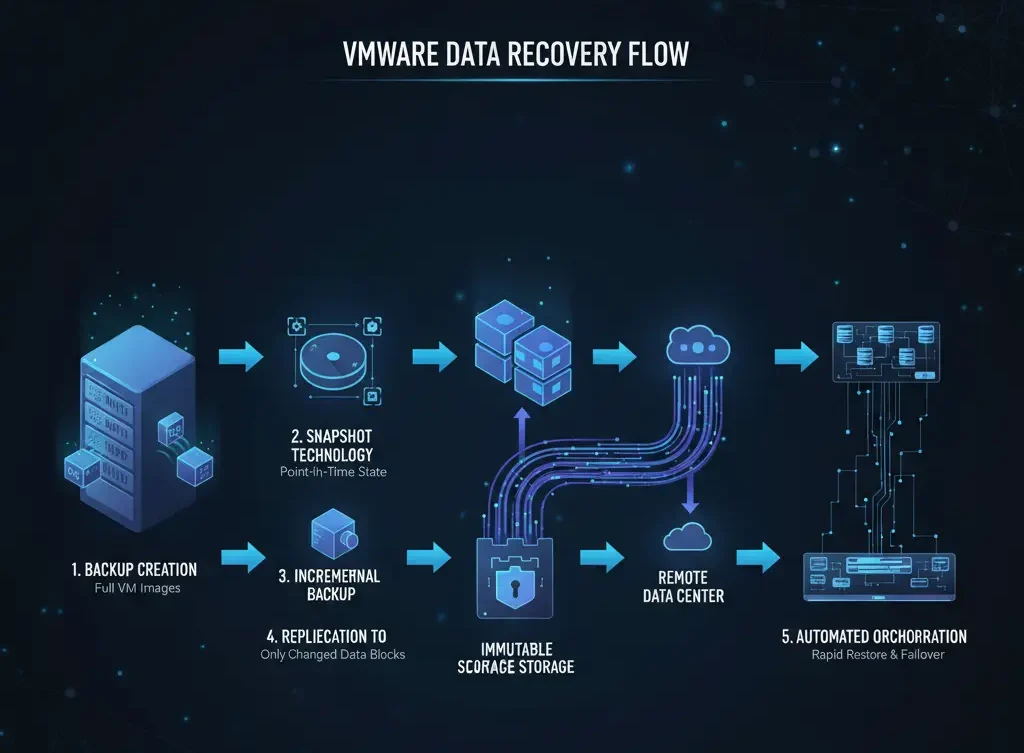
A VMware recovery system is not a single tool — it is a set of technologies working in layers. Here is how those layers work in sequence, from the moment data is captured to the moment a recovered workload is back in production:
Backup Creation
Backup platforms capture complete VM images — operating system, application data, configuration files, and VM metadata. These full-image backups are the foundation of any restore operation. Without them, there is nothing to recover from.
Snapshot Technology
VMware snapshots capture the exact state of a VM at a specific moment in time. They are ideal for pre-change checkpoints — before a patch or a config update — and allow you to roll back in minutes if something breaks.
Snapshots Are Not Backups
Snapshots are stored on the same datastore as the VM. If that storage fails, you lose both the VM and the snapshot. Always use snapshots alongside a proper backup solution, never instead of one.
Incremental Backup Processing via CBT
After an initial full backup, modern tools use Changed Block Tracking (CBT) — a VMware technology documented in the vSphere documentation — to capture only the data blocks that changed since the last backup. This can reduce backup windows and storage use by up to 90%, making frequent backups practical even in large environments.
Replication to Secondary Infrastructure
Replication continuously copies VM data to a secondary location — a remote data centre, a cloud environment, or a DR site. Unlike backups that are point-in-time, replicas are near-live copies. When the primary site fails, replication is what gives you an RTO measured in minutes rather than hours.
Automated Recovery Orchestration
Orchestration platforms like VMware Site Recovery Manager automate the entire recovery sequence. They restart VMs in the correct dependency order, reconfigure networking, run validation tests, and alert the team when services are confirmed online. Automation is what separates a 15-minute recovery from a 6-hour scramble.
Enterprise VMware Data Recovery Architecture
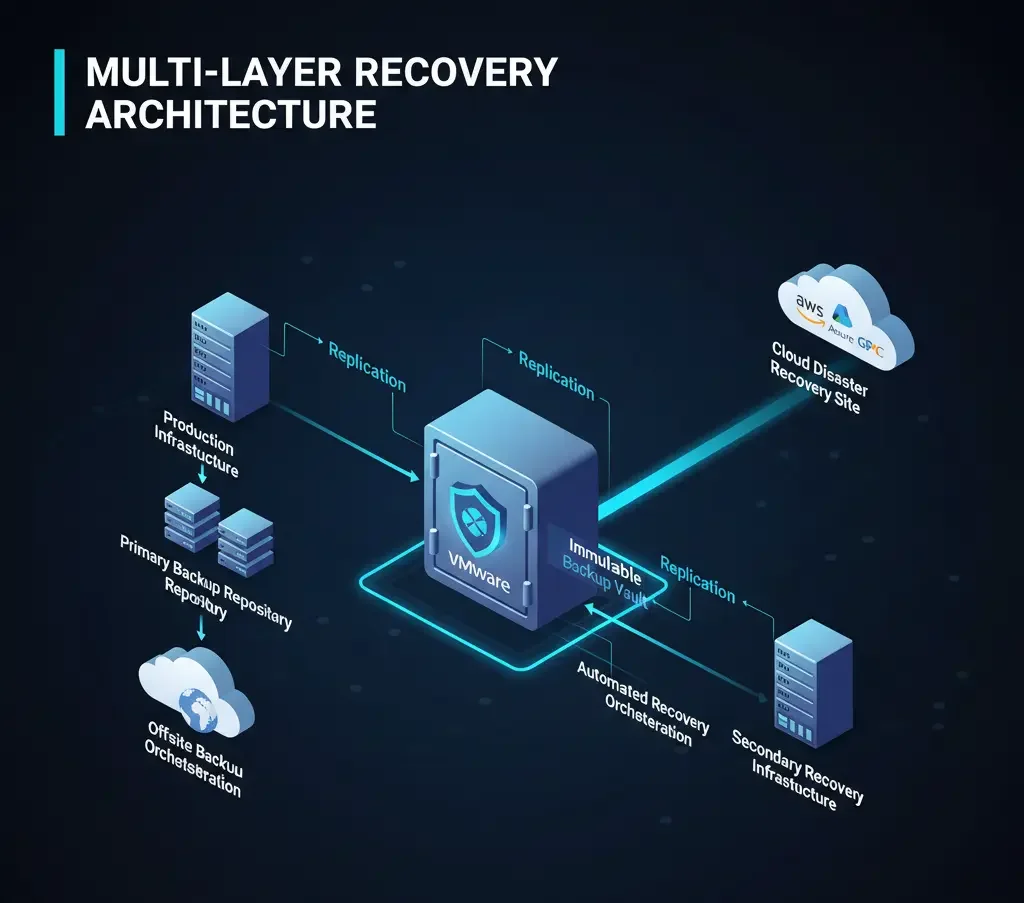
Enterprise recovery architectures are built in layers. Each layer has a specific job, and they are designed to work together so that no single failure point can take everything down.
The Enterprise VMware Recovery Stack
VMware vSphere production infrastructure → Backup platform (Veeam / Commvault / Veritas) → Immutable backup storage → Replication to secondary data centre → Disaster recovery orchestration → Cloud DR for failover.
Production VMware Environment
The primary layer: ESXi hypervisors, shared storage (SAN, NAS, or vSAN), virtual networking, and vCenter Server for centralised management. This is where all workloads run.
Backup Infrastructure Layer
Backup platforms connect to VMware APIs (VADP) to capture agentless VM backups, track incremental changes, trigger instant VM recovery, and run automated verification jobs — all without installing agents inside the guest OS.
Replication & DR Layer
VMware Site Recovery Manager and vSphere Replication handle the automated failover logic — maintaining VM dependency maps, running non-disruptive test failovers, and ensuring applications come back in the right order.
Secondary Recovery Infrastructure
Secondary sites use enterprise storage platforms from Dell Technologies, NetApp, and HPE for high-performance recovery at scale. Cloud options from AWS, Azure, and Google Cloud provide flexible, on-demand DR capacity.
VMware Disaster Recovery vs Backup: Know the Distinction
VMware Disaster Recovery
A complete strategy — not just a tool — for restoring IT services and business operations after a catastrophic event affecting an entire data centre or region. It involves continuous replication to a secondary site and automated failover orchestration, so recovery happens in minutes rather than days.
According to Gartner, organisations with automated disaster recovery orchestration reduce downtime by up to 70% compared to those relying on manual recovery processes. [3] The difference comes down to two metrics every IT team should know:
RPO and RTO — Explained Simply
Recovery Point Objective (RPO): How much data loss is acceptable? An RPO of 1 hour means you can afford to lose up to 1 hour of data. This number drives how often you back up and replicate.
Recovery Time Objective (RTO): How long can the business be down? An RTO of 4 hours means systems must be restored within 4 hours of a failure. This number drives how much automation and secondary infrastructure you invest in.
Both metrics must come from the business — not from IT. Different workloads will have different tolerances, and your recovery architecture should be designed around those differences.
Key Tools Used for VMware Data Recovery
VMware environments can be protected using a combination of native VMware tools and third-party platforms. The right choice depends on your RTO/RPO targets, budget, and environment complexity. Technobind's Enterprise Data Protection team can help you evaluate the right fit.
VMware Native Recovery Technologies
VMware vSphere Replication
Built-in asynchronous VM replication with configurable RPOs and point-in-time recovery. Works with or without array-based replication. Refer to the official vSphere Replication documentation for technical configuration details.
VMware Site Recovery Manager
Full DR orchestration platform with automated failover, non-disruptive DR testing, and recovery plan automation across multiple sites and cloud environments. See VMware SRM technical documentation for architecture details.
VMware Site Recovery Manager (SRM)
SRM is an orchestration platform that automates failover and failback of VMs between sites. It lets you run non-disruptive recovery tests at any time without impacting production, and handles the complex sequencing of multi-VM application restarts automatically. Think of it as the conductor for your recovery orchestra.
Third-Party Data Protection Platforms
For most enterprise environments, third-party platforms add capabilities that VMware's native tools do not offer — particularly around immutable storage, ransomware detection, and granular recovery.
Veeam Backup & Replication
The most widely deployed backup solution for VMware environments, known for its instant recovery capabilities and deep ransomware protection features.
- Instant VM recovery to any infrastructure
- Immutable backups and hardened repositories
- Native cloud backup integration (AWS, Azure, GCP)
- Ransomware detection and secure restore
Commvault Data Protection
A comprehensive enterprise platform covering backup, recovery, and data governance across hybrid and multi-cloud environments.
- Automated backup orchestration at scale
- Built-in compliance and governance reporting
- AI-driven anomaly detection for early ransomware warning
Veritas NetBackup
Built for the largest enterprise environments where scale, compliance, and workload diversity are primary concerns.
- Protection for thousands of diverse workloads
- Cloud-integrated disaster recovery
- Advanced threat detection and anomaly alerting
VMware Ransomware Recovery Strategy
VMware Ransomware Recovery Strategy
A layered plan for restoring virtual machines and data after a ransomware attack — using immutable backups, isolated recovery environments, and automated orchestration to minimise downtime and prevent reinfection before recovered systems return to production.
Ransomware has fundamentally changed how organisations think about backup. Attackers now target backup infrastructure first — because if they can destroy your backups, you have no choice but to pay. According to the IBM Cost of a Data Breach Report 2024, organisations using AI-driven security automation reduced breach costs by an average of $1.8 million compared to those without automation. [4]
A credible VMware ransomware recovery strategy includes all of the following — not just some of them:
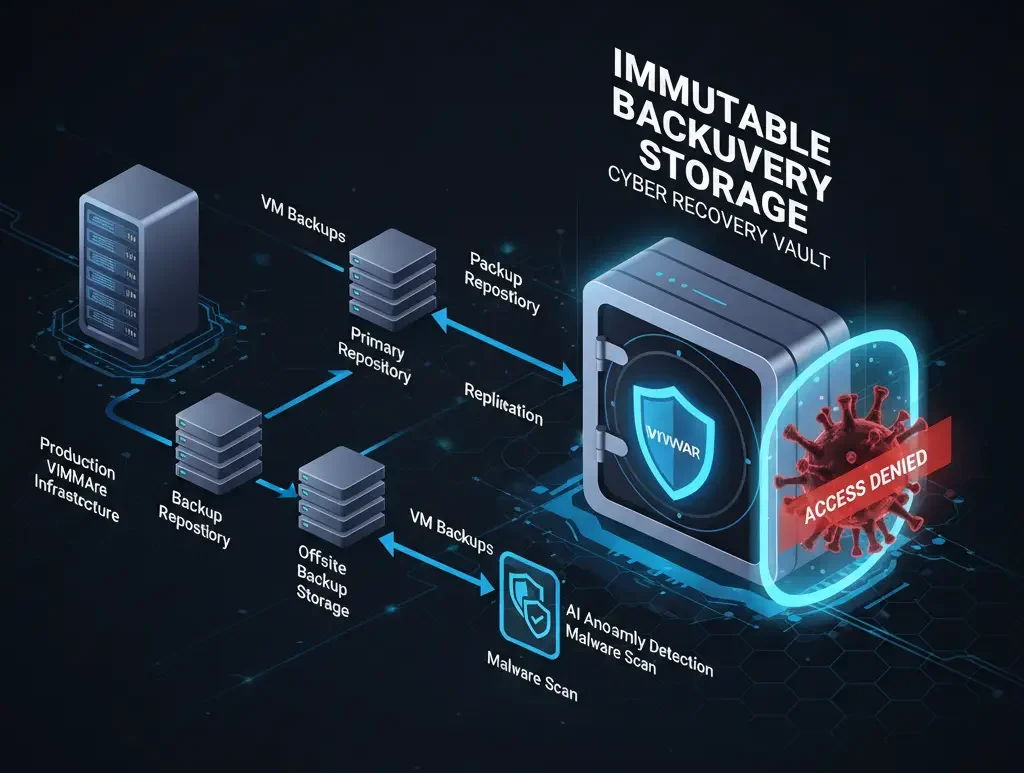
Immutable Backups (WORM Storage)
Write Once, Read Many storage means ransomware cannot encrypt or delete your backup copies. This is your ultimate fallback. Without immutability, your backups are just as vulnerable as your production data.
Air-Gapped or Offline Backups
Copies stored in offline or logically isolated environments cannot be reached by ransomware spreading across your network. Even one clean, air-gapped copy can be the difference between recovery and ransom payment.
Frequent Backups to Shrink RPO
The more frequently you back up, the less data you lose when an attack hits. Hourly or shorter-interval backups give you recent, clean restore points and reduce the business impact of any incident.
Automated Recovery Validation
Regular automated restore tests in isolated environments confirm two things: your backups are recoverable, and the restored VMs are malware-free before they go anywhere near production.
Isolated Recovery Environment (IRE)
A dedicated, network-isolated environment where infected VMs are restored, scanned, and sanitised. Never restore directly to production without a clean-room validation step.
Behavioural Anomaly Detection
Tools that monitor VM behaviour and data access patterns can detect ransomware activity in progress — enabling containment before encryption spreads across the environment.
Ransomware-Specific Incident Response Plan
A documented, tested IR plan covering containment, eradication, recovery sequencing, and post-incident review. The middle of an attack is the wrong time to figure out who does what.
MFA on All Backup Systems
Multi-factor authentication on backup consoles and recovery platforms prevents attackers from disabling your protection even if they obtain admin credentials.
Best Practices for VMware Data Recovery
These are the practices that separate organisations that recover quickly from those that spend days restoring systems after a major incident.
Define Your RPO and RTO Before Anything Else
Every decision in your recovery architecture flows from these two numbers. Without them, you are guessing. Work with business stakeholders to define acceptable data loss (RPO) and acceptable downtime (RTO) for each workload tier. Tier 1 systems like ERP and databases need very different targets from internal tools.
Make Immutable Backup Storage Non-Negotiable
If ransomware can touch your backups, your recovery strategy has a critical gap. All major cloud providers support immutable storage policies:
- Amazon Web Services — S3 Object Lock
- Microsoft Azure — Blob immutable storage policies
- Google Cloud Platform — Cloud Storage retention locks
On-premises solutions from Veeam (Hardened Repository) and purpose-built appliances from Dell and HPE also provide WORM-compliant immutable storage.
Follow the 3-2-1-1-0 Rule
The updated ransomware-era backup rule: 3 copies of data, on 2 different media types, with 1 copy offsite, 1 copy immutable or air-gapped, and 0 errors verified after restore testing. Every number matters.
Automate DR Testing — Do Not Leave It to Manual Drills
Recovery plans that are never tested are not recovery plans — they are documents. VMware Site Recovery Manager supports non-disruptive, automated DR tests that run against live replicas without affecting production. Schedule these quarterly at a minimum, and review results every time.
Secure Your Backup Infrastructure Like Production
Attackers know that targeting backup systems is the fastest path to a ransom payment. Treat your backup infrastructure with the same security rigour as your most critical production systems: role-based access control, network segmentation, MFA on all admin consoles, and encryption at rest and in transit.
VMware Backup Best Practices for Enterprises
Good backup practices reduce backup windows, cut storage costs, and ensure restores actually work when you need them. For tailored guidance, Technobind's enterprise data management team can assess your current setup and identify gaps.
Use VMware VADP for Agentless Backup
VMware's vStorage APIs for Data Protection (VADP) let backup tools copy VM data without installing any software inside the guest operating system. This means cleaner, faster, lower-overhead backups that do not compete with application resources. Always choose backup platforms that integrate natively with VADP.
Enable Changed Block Tracking (CBT)
CBT tracks exactly which data blocks changed since the last backup. Instead of copying an entire VM every time, your backup software copies only the differences. This can cut backup time and storage use by up to 90%, making frequent backup schedules practical even in large environments.
Distribute Backup Proxy Load
Spread backup proxy servers across your infrastructure to balance the load during backup windows and prevent any single host from becoming a bottleneck. Properly sized and distributed proxies are the most common fix for slow backup jobs.
Implement Storage Tiering
Keep recent backups on fast storage for quick restores, and automatically move older backups to lower-cost object storage or tape. Tiering keeps your costs manageable without sacrificing recovery speed for recent recovery points.
Isolate Backup Traffic on a Dedicated VLAN
Running backup traffic on the same network as production is a recipe for congestion during peak backup windows. A dedicated backup VLAN with high-bandwidth connections keeps production performance stable and backup jobs predictable.
Take Application-Consistent Backups for Critical Workloads
For databases, Exchange, and other transactional applications, use VSS (Volume Shadow Copy Service) coordination to ensure backup data is in a consistent, transaction-complete state. Crash-consistent backups of database VMs often cannot be restored to a fully working state.
VMware Disaster Recovery for Hybrid Cloud
An increasing number of enterprises are using public cloud as their DR site rather than building and maintaining a second physical data centre. This approach — Disaster Recovery as a Service (DRaaS) — changes the economics of DR significantly. Technobind's hybrid cloud architecture experts can help you design a solution that fits your workloads and budget.
Using Cloud as Your DR Site
Hybrid cloud disaster recovery combines on-premises VMware infrastructure with public cloud resources (AWS, Azure, Google Cloud) to provide a flexible, scalable recovery option. VMs are replicated to the cloud, and when an outage hits, workloads failover to cloud instances. When the primary site is restored, they fail back. You only pay for compute when you actually need it.
Cloud as DR Site (DRaaS)
Public cloud eliminates the need for a second physical data centre. You replicate to the cloud continuously, and failover when needed. Compute costs are only incurred during actual DR events or scheduled tests.
Flexibility and Scale on Demand
Cloud environments can provision recovery capacity in minutes. You are not limited by the size of a physical secondary site. Scale up or down based on exactly what you need to recover.
Watch Out for These Challenges
Hybrid cloud DR introduces complexity. Network connectivity (VPN or Direct Connect), data egress costs, latency between sites, and security configuration across both environments must all be carefully managed.
Future Trends in VMware Data Recovery
The next generation of VMware data recovery is being shaped by AI, cloud-native architectures, and increasingly sophisticated ransomware threats. Here is where the industry is heading:
AI-Driven Backup Intelligence
Machine learning is being used to analyse backup patterns, predict infrastructure failures before they happen, and detect anomalies in data change rates that signal ransomware activity. Early detection means earlier containment.
Cloud-Native DRaaS Integration
Tighter integration between VMware platforms and public cloud providers is making cloud-based DR faster to configure and cheaper to operate. Consumption-based pricing means you only pay when you actually need the capacity.
Cyber Recovery Vaults
Dedicated, hardened, immutable storage environments specifically designed for ransomware recovery. Isolated from the main network, these vaults give organisations a guaranteed clean recovery point regardless of how far an attack has spread.
Self-Healing Infrastructure
Policy-driven automation that can detect a failure and initiate recovery without waiting for human intervention. Next-generation DR platforms will make autonomous, sub-minute recovery a realistic target for Tier 1 workloads.
Key Takeaways
Recovery Is a Business Function, Not an IT Afterthought
VMware data recovery goes beyond backup — it ensures the business stays operational through failures, attacks, and disasters.
Architecture Must Cover All Four Layers
Production environment, backup infrastructure, replication, and secondary recovery sites — all four layers must be in place and tested.
Define RPO and RTO First
These two metrics drive every architecture and tooling decision. Get them from the business, not from IT assumptions.
Immutable Backups Are Non-Negotiable
If ransomware can reach your backups, your recovery strategy has already failed at the most critical point.
Untested Recovery Plans Are Not Recovery Plans
Automated, regular DR testing is the only way to know your plan will work when you actually need it.
Hybrid Cloud DR Reduces Cost and Increases Flexibility
Public cloud as a DR site eliminates secondary data centre overhead and gives you scalable recovery capacity on demand.
Feature Comparison: VMware Data Recovery Tools
This table compares the capabilities of the most commonly deployed VMware data recovery tools across the features that matter most for enterprise resilience.
| Feature | vSphere Replication | VMware SRM | Veeam B&R | Commvault | Veritas NetBackup |
|---|---|---|---|---|---|
| Primary Purpose | VM Replication | DR Orchestration | Backup & DR | Unified Data Protection | Enterprise Backup & DR |
| Replication Type | Asynchronous | Uses vSphere Rep / array-based | Image-based, CDP | Block-level, App-aware | Block-level, App-aware |
| Automated Failover | Requires SRM | Yes | Yes | Yes | Yes |
| Non-Disruptive DR Testing | Requires SRM | Yes | Yes | Yes | Yes |
| Granular File/App Recovery | VM-level only | VM-level only | Files & app items | Files & app items | Files & app items |
| Immutable Backups | N/A | N/A | Object Lock + Hardened Repo | Object Lock | AIR / WORM |
| Cloud DR Integration | Limited | Limited | AWS, Azure, GCP | AWS, Azure, GCP | AWS, Azure, GCP |
| Ransomware Detection | No | No | Anomaly Detection | AI-driven | Threat Detection |
| Agentless VM Backup | N/A | N/A | Yes | Yes | Yes |
"In today's threat landscape, VMware data recovery is not just about restoring data — it is about enabling rapid business resilience and maintaining trust. Organisations must move beyond simple backups to comprehensive, automated, and immutable recovery strategies. The convergence of AI, hybrid cloud, and advanced cyber recovery vaults will define the next generation of enterprise data protection."
Protect Your VMware Environment from Ransomware & Downtime
Technobind helps enterprises design resilient VMware backup and disaster recovery architectures, ensuring your business continuity regardless of what hits.
Schedule a VMware Recovery Consultation →Conclusion
Enterprise organisations depend on virtualised environments to run their most critical applications and services. A single unplanned outage — whether from ransomware, hardware failure, or human error — can cost hundreds of thousands of dollars per hour and damage customer trust in ways that take far longer to repair than the systems themselves.
A well-designed VMware data recovery strategy integrates backup, replication, immutable storage, and automated disaster recovery orchestration so that workloads can be restored quickly with minimal disruption. The organisations that recover in minutes instead of days are not the ones with better luck — they are the ones that built and tested a proper recovery architecture before the incident happened.
By combining VMware native tools with enterprise-grade data protection platforms and following the practices outlined in this guide, your organisation can build infrastructure that handles failures, ransomware attacks, and large-scale disasters without catastrophic business impact. Investing in a modern VMware recovery architecture is not just an IT project — it is a strategic requirement for long-term business resilience.